
Dharmendra
Google Workspace Automation Specialist
Apps ScriptGmail & CalendarGoogle Forms
Hire a Google Docs expert when your team still types contracts, quotes or reports by hand from data you already have. We build templates that fill themselves from Google Sheets or Forms for any business, with rates from $15/hr.
Post a ProjectThese are the developers on our team who build Docs templates and the automation around them, including Forms, Slides, Gmail and Drive.



Not sure who fits? Tell us about the document and we’ll pick the right person.
Most of these start with the same complaint: the information is already in a sheet or a form, and someone still retypes it into a document.
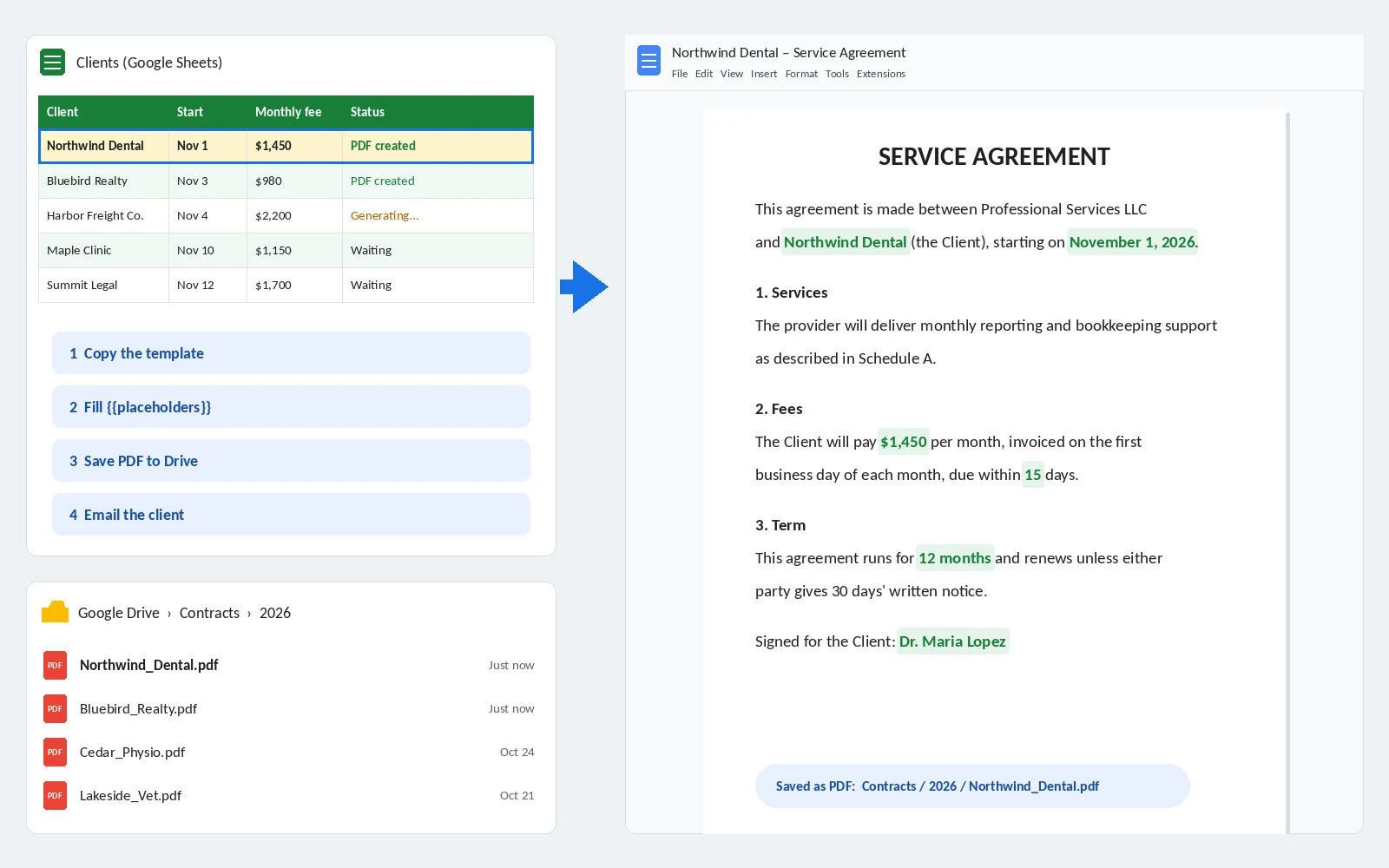
Each row in your client sheet becomes a finished agreement from your own template, saved as a PDF and ready to send.
Line items, totals and tax come from the sheet, each document is numbered automatically, and a PDF copy is filed in the client’s folder.
Offer letters, renewal notices or certificates are created one per person from a list, then emailed through Gmail with the PDF attached.
Inspection, intake or incident forms turn into a formatted report the moment someone presses Submit.
We rebuild messy templates with proper heading styles, a table of contents and locked wording, so the layout survives editing.
A document is created, sent to the approver and marked approved or rejected in the sheet, with the date and name recorded.
With the Google Docs API, your system can create and fill documents directly, like a proposal generated from your CRM.
Have a document you retype every week? Post your project and describe it.
This is the setup behind most of our Docs automation. It runs on Apps Script, which is free with your Google account.
We add placeholders like {{Client Name}} and {{Start Date}} to your own Google Doc, so the wording and branding stay yours.
A script copies the template, swaps each placeholder for that row’s values and names the file, like “Northwind Dental – Service Agreement”.
It saves a PDF in the right Drive folder, emails it to the client if you want, and writes the link back into the sheet.
Want this for your own documents? Post your project and tell us about the template.
Google Forms is the easiest way to collect information the same way every time, but the answers often end up in a sheet nobody reads. We connect the form to the rest of the job.
A technician submits an inspection form on a phone, and the manager gets a formatted PDF report by email a minute later. A new client fills in an intake form, and a Drive folder and a welcome letter are created on the spot. Answers are checked as they arrive, so a missing value or a wrong date gets flagged instead of filed.
Have a form that leads to manual work? Tell us what happens after Submit.
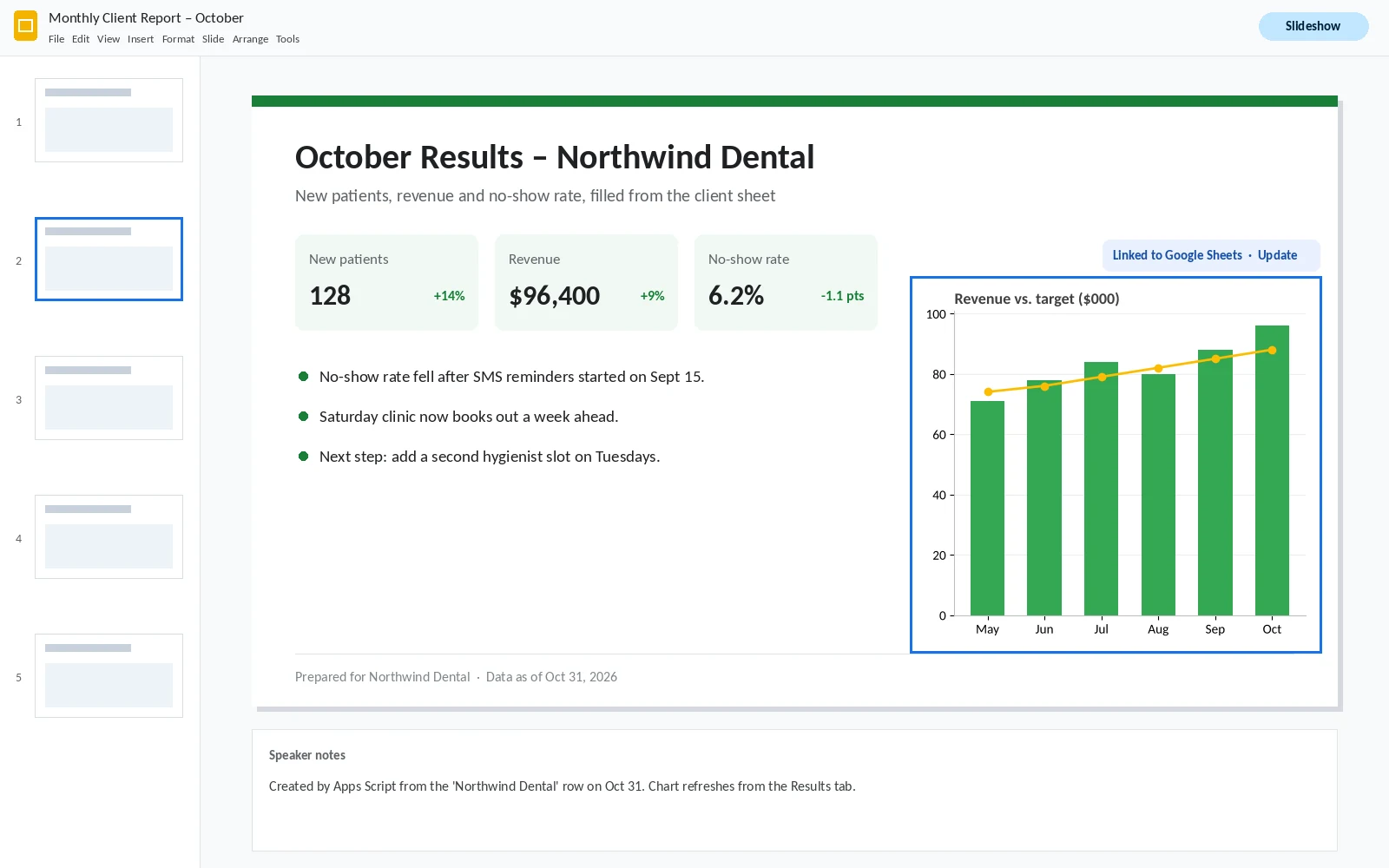
If someone spends the last day of every month copying numbers and charts into client decks, Slides can be filled the same way as Docs.
Charts in Slides can be linked to Google Sheets, so they refresh with one click instead of being pasted again. For decks that change every month, a script copies the template, fills the text for each client and saves the finished deck in their folder.
Building the same deck every month? Post your project.
Delivered a streamlined Google doc in a timely manner. Good communicator during the process.
Delivered exactly what was hoped for. Easy to work with.
Very professional, a pleasure to deal with.
Want documents that create themselves? Post your project.
| Template cleanup, styles and formatting | $15–25/hr |
| Documents created from a sheet or form | $25–40/hr |
| Slides decks filled from sheet data | $25–40/hr |
| Approval workflows and Docs API integrations | $30–50/hr |
You get a fixed quote before work starts and pay after you approve it. Apps Script and the Docs API are free for standard use, so there’s no extra software to buy.
Want a price for your documents? Post your project.
Tell us which document you type today and where its information comes from. Mention the template if you have one.
We reply with how it’ll work and a fixed price, usually within the hour.
Your developer creates real documents from your data with you, adjusts anything that’s off, and you pay after sign-off.
Ready when you are. Post your project. It takes about three minutes.
What does a Google Docs expert do?
A Google Docs expert builds templates and the automation around them, so contracts, quotes, letters and reports are created from your data instead of typed. Ours also repair broken templates and connect Docs to Sheets, Forms, Slides and Gmail.
How much does it cost to hire a Google Docs expert?
Most Google Docs work costs $15 to $50 an hour. Template cleanup is at the low end, and document automation or Docs API work is at the top. You get a fixed quote first and pay after you approve.
Can you create Google Docs automatically from Google Sheets?
Yes. A script copies your template for each row, fills in the values, saves the document or a PDF to Drive and writes the link back to the sheet.
Can a Google Form create a PDF and email it?
Yes. When a form is submitted, a script fills a Docs template with the answers, saves it as a PDF and emails it to whoever needs it.
Can you automate Google Slides too?
Yes. We fill Slides templates from sheet data and link charts to Google Sheets, so they update without copying and pasting.
Is the Google Docs API free?
Yes. Google doesn’t charge for standard use of the Docs API. Most document automation runs on Apps Script, which is also free with your Google account.
Do you format existing documents?
Yes, when the goal is a template your team will reuse. We set up heading styles, numbering, a table of contents and locked sections, so the layout holds up when people edit it.
Didn’t see your question? Ask us directly.
Whatever you retype each week, the quickest start is to post your project.
Tell us which documents you create by hand. You’ll get a fixed quote from $15/hr, and you pay once the first ones come out right.
Get a Free Quote