
Akhilesh
Google Sheets API Developer
Sheets APIREST & WebhooksData Sync
Hire a Google Sheets API developer when your data lives in other apps and someone still exports it into a sheet every morning. We connect Google Sheets to the tools any business runs on, with a fixed quote first and rates from $15/hr.
Post a ProjectThese are the developers on our team who handle API and integration work, from a one-way import to a full two-way sync.



Not sure who fits? Name the apps you want connected and we’ll pick the developer.
Most requests start the same way: someone downloads a CSV from one app, pastes it into a sheet, fixes the columns and does it all again tomorrow. Here’s what we usually connect instead.
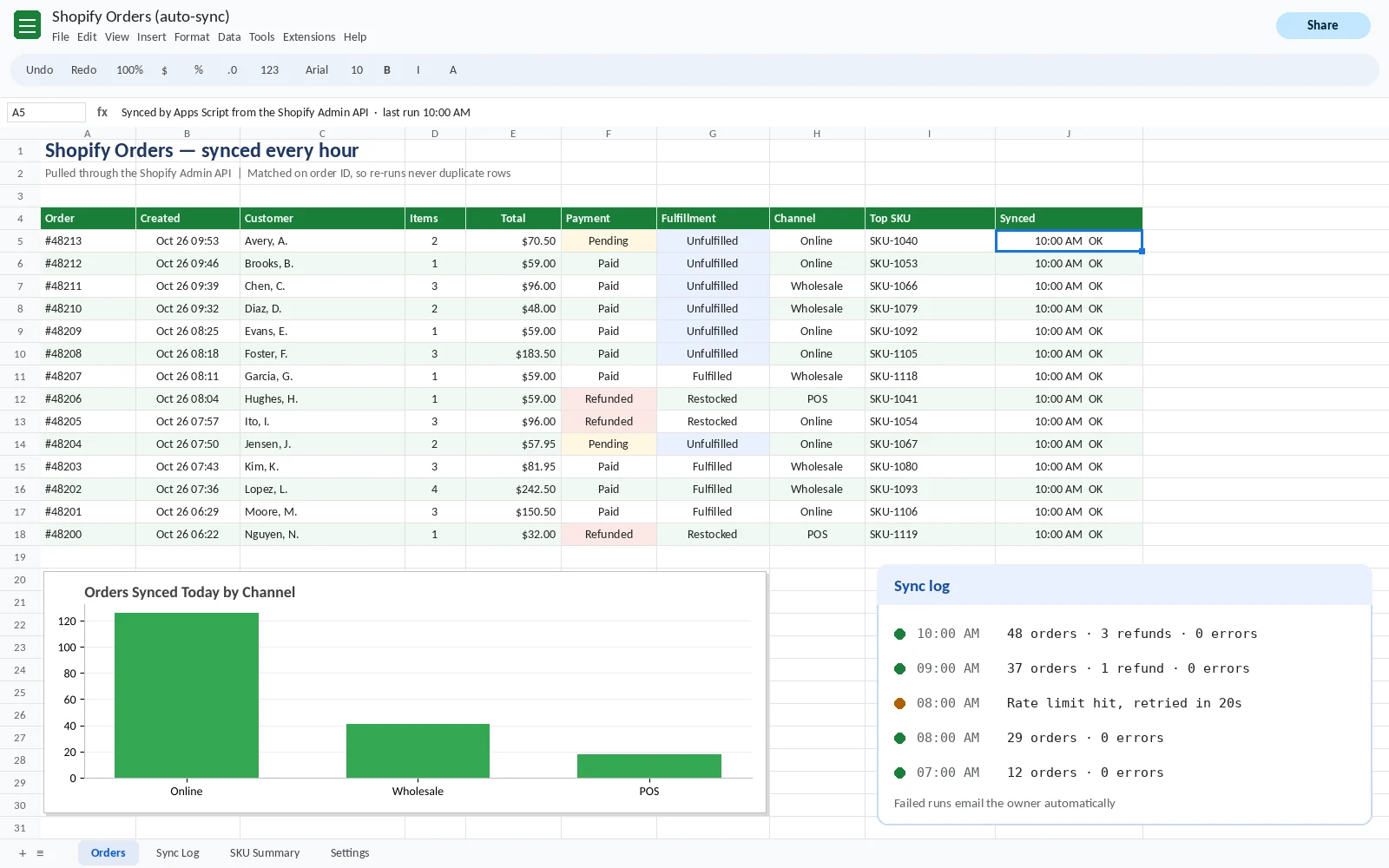
Orders, refunds and stock levels land in your sheet every hour, already split by SKU, so the ops team stops exporting and re-sorting files.
Deals, stages and owners sync into Sheets for the weekly sales meeting. If a rep updates a deal, the sheet picks it up on the next run.
New subscriptions, cancellations and failed payments flow in daily, so monthly recurring revenue and churn are always current.
Invoices, bills and balances pull into one sheet, and overdue invoices are flagged before anyone has to ask.
Spend, clicks and conversions from each platform come into one tab, so the weekly marketing report builds itself.
A new lead, stock below the reorder point or a deal marked won posts straight to the right Slack channel.
Your product or database sends rows to Google Sheets through the Sheets API, so support and finance can use the data without database access.
Edits made in the sheet go back to the source app, like new prices for your store or statuses for your CRM, with checks so bad data can’t slip through.
Don’t see your app? If it has an API, we can usually connect it. Post your project and name the tools.
You don’t need to know any of this to hire us, but it helps when you read a quote.
Got a quote with words you don’t recognize? Ask us and we’ll explain it plainly.
There’s more than one way to connect Google Sheets to another app. We’ll recommend the cheapest option that’s reliable for your job, even when that means you don’t need a developer.
| Apps Script | Google Sheets API | Zapier or Make | |
|---|---|---|---|
| Where it runs | Inside your Google account | On your own server or app | On their platform |
| Running cost | Free with your Google account | Free for standard use, plus hosting | Monthly plan based on tasks |
| Best for | Scheduled imports, alerts and documents | High volume, your own product, two-way syncs | Simple triggers between popular apps |
| Watch out for | Each run stops after 6 minutes | Someone has to host and maintain it | Costs climb with volume, and complex logic is hard |
Most small and mid-sized businesses end up with Apps Script, because it runs free inside Google and needs no server. When a job outgrows it, we move the heavy part to the Sheets API. If your work stays inside Google, our Apps Script developers are the better fit.
Not sure which one fits? Describe the job and we’ll tell you for free.
Most integrations work on day one. The trouble starts a few months later, so these are the problems we design around from the start.
We read columns by their header name, not their position, and send an alert if a header the sync needs goes missing.
Each record is matched on its own ID, like an order number, so running a sync twice updates rows instead of copying them.
Access is set up to refresh on its own. If it can’t, you get an email that says exactly what to reconnect.
Google allows 300 read and 300 write requests a minute per project. We batch updates, so a sync uses a handful of requests instead of thousands.
Every run writes a line to a log tab, and a failed run emails the owner. You’ll know before a report goes out with old numbers.
API keys go into protected script settings, never into a cell that anyone with edit access can read.
Already have an integration that keeps breaking? Post it as a project and we’ll fix it.
Delivered exactly what was hoped for. Easy to work with.
Very professional, a pleasure to deal with.
Great work timely and error free.
Need data moving between your apps? Post your project.
| One app into Google Sheets on a schedule | $25–40/hr |
| Slack or email alerts from sheet data | $25–40/hr |
| Two-way syncs, webhooks and several apps | $30–50/hr |
| Your own app writing to Sheets through the API | $30–50/hr |
Every job gets a fixed quote before work starts, and you pay after you’ve approved it. The other app’s API may need its own paid plan, and we’ll point that out before you commit.
Want an exact number? Post your project and get a fixed quote.
Tell us which tools hold the data and what the sheet should show. A screenshot of the export you use today helps.
We reply with how we’d connect them, which method fits and a fixed quote, usually within the hour.
Your developer builds it on a copy, runs it with real data while you watch, and you pay after sign-off.
Ready when you are. Post your project. It takes about three minutes.
How much does it cost to hire a Google Sheets API developer?
Most integration work costs $25 to $50 an hour. A one-way import from a single app sits at the lower end, and two-way syncs or several connected apps sit at the top. You get a fixed quote first and pay after you approve.
Is the Google Sheets API free?
Yes. Google doesn’t charge for standard use of the Sheets API. It limits each project to 300 read and 300 write requests a minute and has said going over those limits will be billed in future, so we batch requests to stay well inside them.
Should I use Apps Script, the Sheets API or Zapier?
Use Zapier for a simple trigger between two popular apps, Apps Script for scheduled imports and alerts inside Google, and the Sheets API when your own app or a large volume of data is involved. We’ll tell you which fits before we quote.
Can you connect Google Sheets to Slack?
Yes. We use a Slack incoming webhook, which is a private address that accepts messages for one channel, and post to it whenever a rule in the sheet is met, like a new lead or low stock.
Who owns the code and the API keys?
You do. Scripts run in your Google account or on your server, keys sit in your protected settings, and nothing depends on our accounts after handover.
What happens if the other app changes its API?
Your log tab and error emails tell you straight away that a run failed. Most changes need a small update, and we can make it once you’ve seen what changed.
Can a Google Sheets API engineer build a two-way sync?
Yes. Each record is matched on its ID, so edits in the sheet can update the source app, with checks that stop blank or invalid values from being sent back.
Didn’t see your question? Ask us directly.
Wherever your data lives, the quickest start is to post your project.
Name the apps you want connected. You’ll get a fixed quote from $15/hr, and you pay once the sync works the way you want.
Get a Free Quote