Free Excel Rent Roll Template
A rent roll is the list of every unit you manage, who lives there, what they pay and when their lease ends. This free Excel rent roll template does the maths for you: it calculates loss-to-lease, vacancy loss and occupancy, and flags every lease that ends in the next 90 days so renewals don't slip.
📥 Download the free rent roll template (.xlsx)No sign-up needed. It works in Excel 2010 and later, and in Google Sheets.
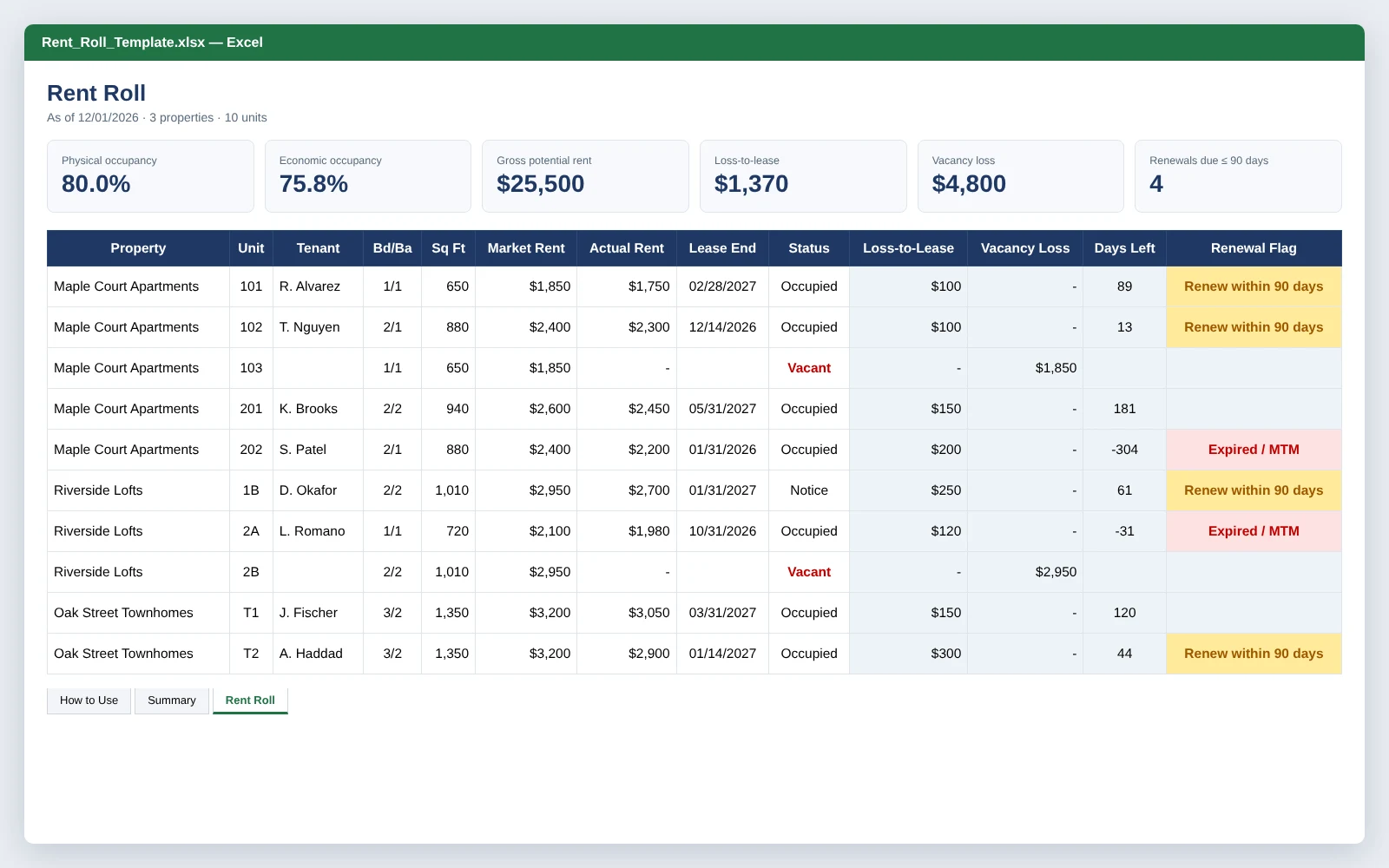
What's in the Template
- Rent Roll sheet: one row per unit, ready for up to 300 units. You fill in the yellow columns and the blue columns calculate.
- Summary sheet: total units, physical and economic occupancy, gross potential rent, loss-to-lease, vacancy loss, upcoming renewals and balances due, plus a breakdown and chart by property.
- How to Use sheet: short instructions, the colour key and what each calculation means.
The example rows use made-up properties and tenants so you can see how it works. Delete them and add your own units.
What a Rent Roll Should Include
| Column | What to enter | Why it matters |
|---|---|---|
| Property and Unit | Building name and unit number | Lets you total and filter by building |
| Tenant | Leaseholder name (blank if vacant) | Who to contact about renewals and balances |
| Beds, Baths, Sq Ft | Unit size | Compare rent per square foot across units |
| Market Rent | What the unit would rent for today | The basis for loss-to-lease and vacancy loss |
| Actual Rent | What the current tenant pays each month | Your real monthly income |
| Lease Start and End | Dates from the lease | Drives the renewal flags |
| Status | Occupied, Vacant or Notice | Drives occupancy and vacancy loss |
| Security Deposit and Balance Due | Deposit held and unpaid rent | Shows exposure if a tenant leaves |
How the Formulas Work
Every calculated column checks first that the row has a unit number, so empty rows stay blank. The formulas use only standard functions (IF, COUNTIF, COUNTIFS, SUMIFS), which is why the file also works in older Excel and Google Sheets.
Loss-to-lease
How far each occupied unit's rent is below market. Vacant units show zero here because they're counted as vacancy loss instead.
=IF($B6="","",IF($K6="Vacant",0,$G6-$H6))Vacancy loss
The market rent you're not collecting on empty units.
=IF($B6="","",IF($K6="Vacant",$G6,0))Days to lease end and renewal flag
Days left are counted from the As-of Date at the top of the sheet, so the report always matches the date you choose. A negative number means the lease has already ended and the tenant is month-to-month.
=IF(OR($B6="",$J6="",$K6="Vacant"),"",$J6-$C$3)
=IF($Q6="","",IF($Q6<0,"Expired / MTM",IF($Q6<=90,"Renew within 90 days","")))
Totals by property
The Summary sheet uses SUMIFS and COUNTIFS against each property name, for example the rent charged at one building:
=SUMIFS('Rent Roll'!$H$6:$H$305, 'Rent Roll'!$A$6:$A$305, A19, 'Rent Roll'!$K$6:$K$305, "<>Vacant")If multiple criteria lookups are new to you, our guide to advanced VLOOKUP with multiple criteria explains how these conditions work.
Physical vs Economic Occupancy
The template shows both, because they tell you different things:
- Physical occupancy = occupied units ÷ total units. In the example, 10 of 12 units are occupied, so physical occupancy is 83.3%. Units on notice still count as occupied until the tenant leaves.
- Economic occupancy = rent charged ÷ gross potential rent (the market rent of every unit). In the example, $24,780 ÷ $30,950 = 80.1%.
When economic occupancy is well below physical occupancy, rents are lagging the market. That gap is your loss-to-lease, and it's often the easiest income to recover at renewal.
How to Use the Template
- Download the file and open the Rent Roll sheet.
- Set the As-of Date in cell C3 to the date of your report.
- Delete the example rows and enter one row per unit. Choose the Status from the dropdown.
- On the Summary sheet, type your property names in the yellow cells, spelled exactly as on the Rent Roll.
- Each month, update rents, statuses and dates, change the As-of Date, and save a copy for your records.
Combining Rent Rolls From Many Files Into One
If each building has its own rent roll file, nobody sees the whole portfolio until someone copies everything together by hand. Power Query, which is built into Excel 2016 and later, can do that for you:
- Save every building's rent roll in one folder, all with the same column headers as this template.
- In a new workbook, go to Data > Get Data > From File > From Folder and pick the folder.
- Click Combine & Transform, choose the sheet that holds the rent roll, then Close & Load.
- Next month, drop the new files into the folder and click Data > Refresh All. The combined list updates by itself.
Property managers in Brooklyn and Queens send us exactly this problem: a dozen rent rolls in a dozen layouts. If your files don't share the same columns, our Excel experts in New York can map them into one rent roll and set up the refresh for you.
Common Rent Roll Mistakes
- Using the asking rent as actual rent. Actual rent is what's on the lease, after any concessions.
- Leaving expired leases unflagged. Month-to-month tenants can leave with short notice, and they're often paying below market.
- Different spellings of the same property. "Maple Ct" and "Maple Court Apartments" are counted as two buildings. Pick one name and use it everywhere.
- No as-of date. A rent roll without a date can't be compared month to month, and lenders and buyers will ask for it.
Frequently Asked Questions
What is a rent roll?
A rent roll is a list of every unit in a property or portfolio, showing the tenant, rent, lease dates and status. Owners use it to track income, and lenders and buyers ask for it when financing or buying a property.
What is loss-to-lease?
Loss-to-lease is the difference between a unit's market rent and the rent the current tenant actually pays. It shows how much income you could gain by bringing leases up to market at renewal.
Does this rent roll template work in Google Sheets?
Yes. Upload the file to Google Drive and open it with Google Sheets. All the formulas and the Status dropdown work. Only the Power Query steps for combining many files are Excel-only.
How many units can the template handle?
It's set up for 300 units. For more, copy the last row down. Then extend the ranges in the Summary sheet formulas so they cover the new rows.
Is the template really free?
Yes. Download it and use it for your own properties with no sign-up. If you want it customised, you can post a project and get a fixed quote.
Need a Rent Roll Built Around Your Portfolio?
We can add your own columns, connect it to your property management exports, combine many buildings into one view, or build a dashboard on top. Hire an Excel expert on a fixed quote, from $15/hr.
Post a Project